HR - Processes
HR-Processes
Key processes trigerred by Human Resources are as given below:
1.Recruitment
2.On-Boarding
3.Leaves & attendance
4.Training & Development
5.Assessment & appraisals
6.HR-Payroll
7.Employee Transfer & Exit
Recruitment
Key activites that need to be performed in the given sequence are as given below:

| Activity | Executed by | Navigation | Link |
|---|---|---|---|
| Job Requisition Creation | General Administrator OR HR Manager OR Head Teacher | Navigation: Home > Select HR Module > Select Recruitment > Job Requisition | [Click here] |
| Job Requisition Approval | Head Teache HR ManagerDirector of Human Resources Director of FinanceDirector of Academics Director of Operations Deputy Director of Operations Finance Manager | Navigation: Home > Select HR Module > Select Recruitment > Job Requisition | [[Click here]] |
| Job Opening Creation | General Administrator OR HR Manager | Navigation: Home > Select HR Module > Select Recruitment > Job Requisition | [[Click here]] |
| Job Applicant Creation | General Administrator or HR Manager OR Applicant | Navigation: Home > Select HR Module > Select Recruitment > Job Applicant or Navigation: Home > Select HR Module > Select Recruitment > Job Opening | [[Click here]] |
| Interview Creation | General Administrator OR HR Manager | Navigation: Home > Select HR Module > Select Recruitment > Select Job Applicant or Navigation: Home > Select HR Module > Select Recruitment > Select Interview | [[Click here]] |
| Interview Feedback Creation | Interviewer | Navigation: Home > Select HR Module > Select Recruitment > Select Interview Feedback | [[Click here]] |
| Interview Submission | General Administrator OR HR Manager | Navigation: Home > Select HR Module > Select Recruitment > Select Interview | [[Click here]] |
| Job Applicant Reference Check | General Administrator OR HR Manager | Navigation: Home > Select HR Module > Select Recruitment > Select Job Applicant | [[Click here]] |
| Job Applicant Approval | General Administrator OR HR Manager | Navigation: Home > Select HR Module > Select Recruitment > Job Applicant | [[Click here]] |
| Job Offer Creation | General Administrator or HR Manager | Navigation: Home > Select HR Module > Select Recruitment > Job Applicant or Navigation: Home > Select HR Module > Select Recruitment > Job Offer | [[Click here]] |
| Job Offer Approval | Head Teacher | Navigation: Home > Select HR Module > Select Recruitment > Job Offer | [[Click here]] |
| Job Offer Acceptance | General Administrator OR HR Manager | Navigation: Home > Select HR Module > Select Recruitment > Job Offer | [[Click here]] |
On-Boarding
Key activites that need to be performed in the given sequence are as given below:

| Activity | Executed by | Navigation | Link |
|---|---|---|---|
| Employee On-Boarding Creation | General Administrator OR HR Manager | Navigation: Home > Select HR Module > Select Employee Lifecycle > Employee Onboarding | [[Click here]] |
| Employee On-Boarding Completion | General Administrator OR HR Manager | Navigation: Home > Select HR Module > Select Employee Lifecycle > Employee Onboarding | [[Click here]] |
| Employee Creation | General Administrator OR HR Manager | Navigation: Home > Select HR Module > Select Employee Lifecycle > Employee Onboarding | [[Click here]] |
| Asset Assignment | Navigation: Home > Select Assets Module > Select Asset Movement | [[Click here]] | |
| Employee Background Verification Documents Updation | Legal Team | Navigation: Home > Select HR Module > Select Employee | [[Click here]] |
| Shift Assignment | General Administrator OR HR Manager | Navigation: Home > Select HR Module > Select Shift & Attendance > Select Shift Assignment | [[Click here]] |
| Employee Mandatory Training Updation | General Administrator OR HR Manager | Navigation: Home > Select HR Module > Select Employee | [[Click here]] |
| Employee Activation | General Administrator OR HR Manager | Navigation: Home > Select HR Module > Select Employee | [[Click here]] |
| Employee ERPNext User Creation | Navigation: Home > Select Users | [Click here]] | |
| Employee Gender - Ratio Report | HR Manager | Navigation: Home > Select HR Module > Goto Key Reports > Employee Analytic | [[Click here]] |
| Employee Status Report | Executed by | Navigation: Home > Select HR Module > Goto Key Reports > Employee Analytic | [[Click here]] |
| Ratio of TS & NTS | HR Manager | Navigation: Home > Select HR Module > Goto Key Reports > Employee Analytic | [[Click here]] |
| Employement Service Period Report | HR Manager | Navigation: Home > Select HR Module > Goto Key Reports > Employee Analytic | [[Click here]] |
Leaves & attendance
Key activites that need to be performed in the given sequence are as given below:
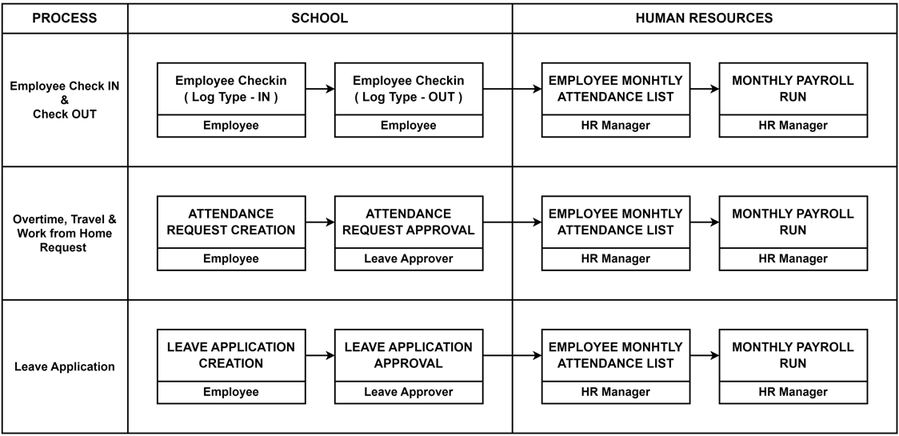
| Activity | Executed by | Navigation | Link |
|---|---|---|---|
| Employee Check - In | Employee | Navigation: Home > Select HR Module > Select Shift & Attendance > Select Employee Checkin | [[Click here]] |
| Employee Check - Out | Employee | Navigation: Home > Select HR Module > Select Shift & Attendance > Select Employee Checkin | [[Click here]] |
| Attendance Request Creation | Employee | Navigation: Home > Select HR Module > Select Shift & Attendance > Select Attendance Request | [[Click here]] |
| Attendance Request Approval | Leave Approver | Navigation: Home > Select HR Module > Select Shift & Attendance > Select Attendance Request | [[Click here]] |
| Leave Application Creation | Employee | Navigation: Home > Select HR Module > Select Leaves > Select Leave Applicatio | [[Click here]] |
| Leave Application Approval | Leave Approver | Navigation: Home > Select HR Module > Select Leaves > Select Leave Application | [[Click here]] |
| Overtime Request | Employee | Navigation: Home > Select HR Module > Select Shift & Attendance > Select Overtime Request | [[Click here]] |
| Overtime Approval | Leave Approver | Navigation: Home > Select HR Module > Select Shift & Attendance > Select Overtime Request | [[Click here]] |
| Holiday List Updation | HR Manager | Navigation: Home > Select HR Module > Select Leaves > Select Holiday List | [[Click here]] |
| Leave Allocation | HR Manager | Navigation: Home > Select HR Module > Select Leaves > Select Leave Policy Assignment | [[Click here]] |
| Monthly Attendance Sheet | Navigation: Home > Select HR Module > Goto Key Reports > Monthly Attendance Sheet Report | [[Click here]] | |
| Employee Leave Balance Summary | Navigation: Home > Select HR Module > Goto Key Reports > Employee Leave Balance Summary Report | [[Click here]] |
Training & Development
Key activites that need to be performed in the given sequence are as given below:
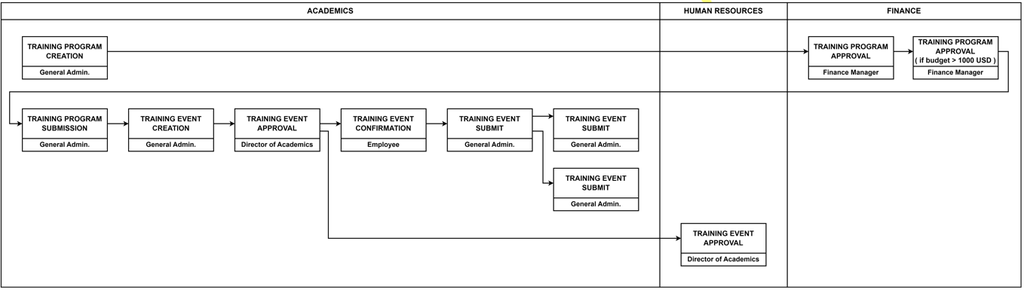
| Activity | Executed by | Navigation | Link |
|---|---|---|---|
| Employee On-Boarding Creation | General Administrator OR HR Manager | Navigation: Home > Select HR Module > Select Employee Lifecycle > Employee Onboarding | [[Click here]] |
| Training Event Creation | General Administrator OR HR Manager | Navigation: Home > Select HR Module > Select Employee Lifecycle > Training Event | [[Click here]] |
| Training Event Submission | Head Teacher | Navigation: Home > Select HR Module > Select Employee Lifecycle > Training Event | [[Click here]] |
| Training Result | General Administrator | Navigation: Home > Select HR Module > Select Employee Lifecycle > Training Results | [[Click here]] |
| Update Data in Employee Master - Training Tab | HR Manager | Navigation: Home > Select HR Module > Select Employee | [[Click here]] |
| Training Request Form Creation | Employee | Navigation: Home > Select HR Module > Select Employee Lifecycle > Training Request Form | [[Click here]] |
| Training Request Form Approval | Head Teacher Director of Academics Director of Human Resources Director of Finance | Navigation: Home > Select HR Module > Select Employee Lifecycle > Training Request Form | [[Click here]] |
| Travel Request Creation | Employee | Home > HR Module > Travel Request | [[Click here]] |
| Attendance Marking in Training Event | General Administrator | Navigation: Home > Select HR Module > Select Employee Lifecycle > Training Event | [[Click here]] |
Assessment & appraisals
Key activites that need to be performed in the given sequence are as given below:

| Activity | Executed by | Navigation | Link |
|---|---|---|---|
| Appraisal Creation ( Self Appraisal Tab ) | Employee | Navigation: Home > Select HR Module > Select Performance > Appraisal | [[Click here]] |
| Employee Performance Feedback Creation | Head Teacher or General Administrator | Navigation: Home > Select HR Module > Select Performance > Employee Performance Feedback | [[Click here]] |
| Appraisal ( Management Tab ) | Director or Managing Director | Navigation: Home > Select HR Module > Select Performance > Appraisal | [[Click here]] |
| Appraisal Submission | HR Manager | Navigation: Home > Select HR Module > Select Performance > Appraisal | [[Click here]] |
| Employee Promotion | HR Specialist | Navigation: Home > Select HR Module > Select Performance > Employee Promotion | [[Click here]] |
HR-Payroll
Key activites that need to be performed in the given sequence are as given below:

| Activity | Executed by | Navigation | Link |
|---|---|---|---|
| Employee Onboarding | HR Manager | Home> HR > Employee Onboarding >New Employee Onboarding | [[Click here]] |
| Salary Data Update | HR Specialist | Home > HR > Employee | [[Click here]] |
| Salary Structure Assignment | HR Specialist | Home > Payroll > Salary Payout > Salary Structure Assignment | [[Click here]] |
| Attendance & Leave Validation | HR Specialist | Home > HR > Attendance / Leave | [[Click here]] |
| Payroll Entry Creation | HR Specialist | Home > Payroll > Payroll Entry | [[Click here]] |
| Salary Slip Creation & Updating | HR Specialist | Home > Payroll > Salary Slip | [[Click here]] |
| Salary Slips approval | Director of HR/ Director of Finance | Home > Payroll > Salary Slip | [[Click here]] |
| Salary Slips Submit | HR Specialist | Home > Payroll > Salary Slip | [[Click here]] |
Employee Transfer & Exit
Key activites that need to be performed in the given sequence are as given below:

| Activity | Executed by | Navigation | Link |
|---|---|---|---|
| Employee Transfer Creation | HR Manager | Navigation: Home > Select HR Module > Select Employee Lifecycle > Employee Transfer | [[Click here]] |
| Employee Exit Creation | HR Manager | Navigation: Home > Select HR Module > Select Employee Lifecycle > Employee Exit | [[Click here]] |
| Exit Interview | HR Manager | Navigation: Home > Select HR Module > Select Employee Lifecycle > Exit Interview | [[Click here]] |
| Exit Questionnaire | HR Manager | Navigation: Home > Select HR Module > Select Employee Lifecycle > Employee Exit Interview Form | [[Click here]] |
| Full and Final Settlement | HR Manager Finance Manager | Navigation: Home > Select HR Module > Select Employee Lifecycle > Full and Final Settlement | [[Click here]] |